For frontline teams, reporting hazards often starts with describing what happened, what was observed, and why it matters. In practice, that process depends heavily on time, writing clarity, and individual experience—especially when reports must be completed during inspections, incident investigations, or routine safety observations.
According to the 2026 EHS Benchmarking Report, 90% of EHS leaders surveyed believ workplace incidents, hazards, or near misses are going underreported, while nearly half point to obstacles such as time required, limited systems, and tedious reporting processes as key barriers.
When details are incomplete or inconsistent, EHS teams lose valuable context and often spend additional time clarifying observations that should have been captured correctly from the start.
How Manual Hazard Reporting Creates Blind Spots Across Sites
Traditional reporting often relies on workers translating what they see into written descriptions. That means identifying hazards, explaining surrounding conditions, and documenting context manually—sometimes under time pressure and in environments where writing speed, language, or reporting experience vary.
This creates inconsistencies in how risks are documented. Similar hazards may be described differently across sites, key environmental details may be omitted, and report quality often depends on who is completing the entry.
Autonomous AI Agents simplify this process by interpreting visual information directly within existing workflows. Instead of starting with manual text entry, teams can begin with what they already capture naturally: an image. AI then structures visual observations into clear, usable reporting language that supports faster follow-up and stronger visibility.
Learn more about Genny AI Automation Agents and how they streamline complex workflows.
How the Genny AI Image Helper Works
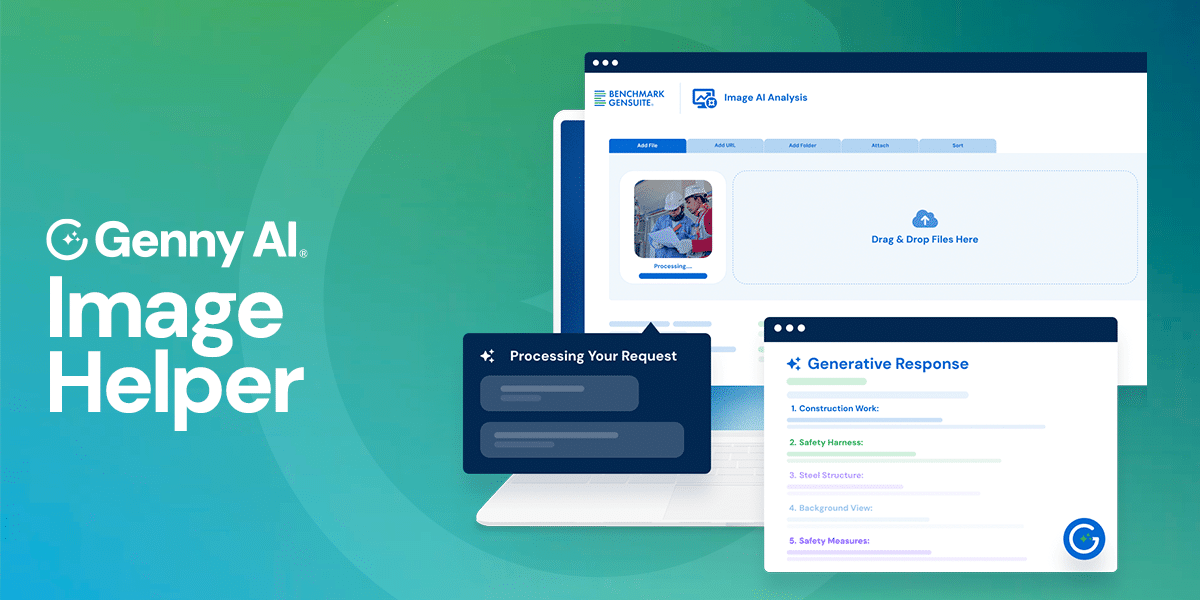
The Genny AI Image Helper begins working as soon as an image is attached within a reporting workflow. Built directly into Benchmark Gensuite applications with attachment functionality, it follows a simple, repeatable process:
- Upload an image during reporting
A photo is added during a concern report, injury report, incident investigation, or inspection. - Analyze visible hazards and conditions
The Agent reviews the image to identify hazards, unsafe conditions, objects, environmental cues, and potential risk factors. - Generate a structured description
A polished summary is created automatically, describing what is visible in clear, standardized language. - Support review before submission
Workers can review or refine the generated description in seconds before completing the report. - Strengthen reporting consistency across sites
Because the same structured logic is applied each time, reporting becomes more consistent regardless of worker experience, language, or writing ability.
Changing Day-to-Day Concern Reporting for EHS Leaders
By transforming images into structured reporting language, the Genny AI Image Helper introduces a new digital co-worker for frontline reporting—one that helps teams capture clearer information without slowing down the reporting process.
Instead of relying entirely on manual write-ups, teams gain faster documentation, clearer descriptions, and stronger consistency across reports. This supports richer operational visibility as hazards are reported in real time.
Built to work alongside frontline teams and EHS professionals, the Genny AI Image Helper supports faster reporting while keeping review, judgment, and decision-making with the people responsible for managing risk and protecting operations. With clearer information entering the system from the start, EHS leaders can focus less on clarifying reports and more on acting on what matters.
See the Genny AI Image Helper in Action
Explore how one image can move hazard reporting from manual description to structured insight—helping teams report faster, capture more detail, and strengthen visibility across operations.